Showing posts with label Ajax. Show all posts

Thursday, March 11, 2010

We just got addictive with 'Autoplay'!

From user feedback, we implemented what we are calling 'Autoplay'.

In the past, if you discovered a topic with more than one video you wanted to watch then you would watch the first video then click the next preview to watch the next video.

Now, with Autoplay, PersistentFan automatically goes to the next video in the list. This allows you to sit back and enjoy a series of interesting videos without stopping what you are doing.

The user experience is outlined in the screenshot below, notice the 'now playing' box around the preview. This is the video the user is currently watching. When the video finishes the next preview to the right becomes the video that starts playing.


Here are a couple of great topics to give this a whirl:
Breaking bands at SXSW 2010
Aziz Ansari
The Simpsons
The Onion
Star Wars Spoofs

Enjoy,
Mike (Bacon)

Friday, June 13, 2008

Dialogs and Asychronous Calls in Facebook

One feature of BaconMarathon's Top3Clicks Facebook application allows users to construct free-form item searches. The search queries are augmented and are used as we attempt to find items that are relevant to the user. To make this work, lots of things are going on in the back-end. The UI output is a list of items displayed in the rotator.

Like any application, we need to make this process as fast as possible, while providing the user visual cues to let them know the application is working quickly to provide a result. One of the strongest pieces of feedback we have had is in this area - and something we've tried to tackle in several different ways.

Our design goals were as follows:

  • call the back-end asynchronously
  • provide cues to the user via a UI dialog
  • tear-down (hide) the dialog when the back-end has completed its' tasks and refresh the UI with the latest information
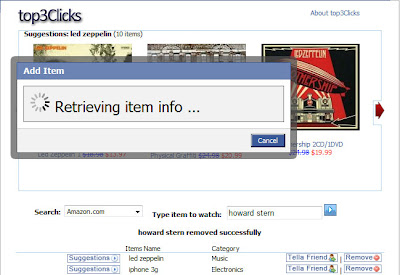
Yesterday, we rolled out our latest iteration (shown below), which utilizes FBJS and Ajax.

Facebook dialog with Ajax post

Using this post as a basis, we made a number of tweaks, most notably the ondone function of the asynchronous call (via ajax.post) handles the form submission and actual tear-down of the dialog. Implementing it was non-trivial as the FBML Test Console didn't seem to like any ajax.post calls we made. Unfortunately, the onerror function does not provide any information about the cause of failure. Firebug was a large help -- make sure to use it if you are debugging FBJS.

Our current implementation looks something like this:


FBJS
function showItemDialog() {
var title = 'Add Item'
var ok = 'Cancel'
//create dialog
var dialog = new Dialog().showMessage(title,add_dialog_fbml,ok);
var ajax = new Ajax();
ajax.responseType = Ajax.FBML;
ajax.requireLogin = true;
//ondone function, called when post returns
ajax.ondone = function(data) {
frm = document.getElementById(searchForm);
if (frm) { frm.submit(); }
dialog.hide();
};

//onconfirm actually does nothing
dialog.onconfirm = function() { };
//grab input value and use in ajax.post call
var item = document.getElementById('item').getValue();
var params={'item':item};
ajax.post("http://www.yourdomain.com/index.php",params);
}
FBML
<form method="get" action=http://apps.facebook.com/yourappname/search.php name="search" id="searchForm">
<input type=text name=item id=item>
<a href="http://apps.facebook.com/yourappname/#" onclick="showItemDialog(); return false;">
<img src="http://www.yourdomain.com/submit.gif" border="0"></a>
</form>
<fb:js_string var="add_dialog_fbml">
<div id="add_dialog">
<div class="dialog_loading">
<img src="http://www.yourdomain.com/loader.gif"/> Retrieving item info ...
</div>
</div>
</fb:js_string>
Try it out and let us know what you think!