Showing posts with label Top3Clicks. Show all posts

Saturday, March 14, 2009

It is all about sharing...

The BaconMarathon team just launched a cool 'sharing' videos with friends feature.

Here is how it works:

Step 1. Find a video that you either totally love or you think your friend will totally love and click on the red 'Share Video With Friends' button. (pic below)


Step 2. When the new pop-up appears, type in friend(s) you'd like to share with and hit 'Send'.
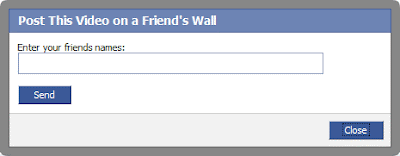


Step 3. On the next screen, type in a witty comment to entice your friend to waste a little of their time watching the video and hit 'Publish'.


Step 4. A message appears on your friends wall and they are notified that you requested them to watch the video!


I have been sharing videos that I have been watching over the last month to my friends all morning. It is a total blast!

As usual, feedback is mandatory and welcome...

-Bacon

Tuesday, October 21, 2008

Fiddling with new Facebook UX features when old features fail

When we launched top3Clicks, as third party developers, we focused about a third of our attention around the users Facebook 'profile' user experience. This was the major way to keep your friends in tune with what you are watching, etc.

With the new Facebook user design, we have found the profile section (now the boxes tab) to be absolutely useless (or to be nice - 'less useful').

We took a hard look at where we could make changes to get friends thinking about friends again and it became crystal clear that the 'news feed' is the only road for seeing what your friends are up to. Sooo, we just released a new update, tweaking our use of 'news feeds' focusing on tipping off your friends when you add items that you are watching in top3Clicks.

For example, if you are interested in watching 'Phillies' items. You can add the item to top3Clicks, example below.


Now notice below that once the item is added, it will appear in your news feed as something you recently added. Your friends will see this item and can either add the item to their top3Clicks page or they can click on an item that is available at Amazon (like the Phillies jersey). This gives your friends a chance to impulse purchase the item.


As the top3Clicks community adds more items this feature is going to really be cool.

Feedback (good & not so good) always welcome.

-The BaconMarathon


Note that the BaconMarathon is supporting the Phillies this year to win the world series over the Rays. The first time since 1980 when Mike Schmidt and Steve Carlton ran the show. Go Phils!

Wednesday, August 27, 2008

The top3Clicks elevator pitch...!

We're very excited to mention here first that we're pitching top3Clicks to participate in the Facebook Fund. The submission is due by the end of this week but here is a taste of the video elevator pitch that will be a part of the submission package.


We're going to just have to wish ourselves luck...

..."luck" ;)

the BaconMarathon Team

Friday, June 13, 2008

Dialogs and Asychronous Calls in Facebook

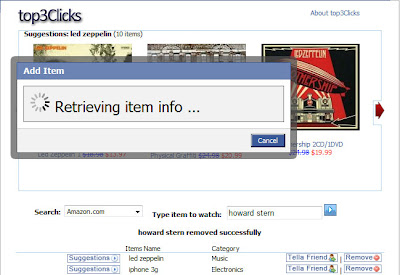
One feature of BaconMarathon's Top3Clicks Facebook application allows users to construct free-form item searches. The search queries are augmented and are used as we attempt to find items that are relevant to the user. To make this work, lots of things are going on in the back-end. The UI output is a list of items displayed in the rotator.

Like any application, we need to make this process as fast as possible, while providing the user visual cues to let them know the application is working quickly to provide a result. One of the strongest pieces of feedback we have had is in this area - and something we've tried to tackle in several different ways.

Our design goals were as follows:

  • call the back-end asynchronously
  • provide cues to the user via a UI dialog
  • tear-down (hide) the dialog when the back-end has completed its' tasks and refresh the UI with the latest information
Yesterday, we rolled out our latest iteration (shown below), which utilizes FBJS and Ajax.

Facebook dialog with Ajax post

Using this post as a basis, we made a number of tweaks, most notably the ondone function of the asynchronous call (via ajax.post) handles the form submission and actual tear-down of the dialog. Implementing it was non-trivial as the FBML Test Console didn't seem to like any ajax.post calls we made. Unfortunately, the onerror function does not provide any information about the cause of failure. Firebug was a large help -- make sure to use it if you are debugging FBJS.

Our current implementation looks something like this:


FBJS
function showItemDialog() {
var title = 'Add Item'
var ok = 'Cancel'
//create dialog
var dialog = new Dialog().showMessage(title,add_dialog_fbml,ok);
var ajax = new Ajax();
ajax.responseType = Ajax.FBML;
ajax.requireLogin = true;
//ondone function, called when post returns
ajax.ondone = function(data) {
frm = document.getElementById(searchForm);
if (frm) { frm.submit(); }
dialog.hide();
};

//onconfirm actually does nothing
dialog.onconfirm = function() { };
//grab input value and use in ajax.post call
var item = document.getElementById('item').getValue();
var params={'item':item};
ajax.post("http://www.yourdomain.com/index.php",params);
}
FBML
<form method="get" action=http://apps.facebook.com/yourappname/search.php name="search" id="searchForm">
<input type=text name=item id=item>
<a href="http://apps.facebook.com/yourappname/#" onclick="showItemDialog(); return false;">
<img src="http://www.yourdomain.com/submit.gif" border="0"></a>
</form>
<fb:js_string var="add_dialog_fbml">
<div id="add_dialog">
<div class="dialog_loading">
<img src="http://www.yourdomain.com/loader.gif"/> Retrieving item info ...
</div>
</div>
</fb:js_string>
Try it out and let us know what you think!

Thursday, May 22, 2008

Whew, one week has flown by...

Big thanks for all you super early adopters that have given top3Clicks a try!!!

Based on your really great feedback, we have made some pretty cool changes to make the notification experience much more useful.

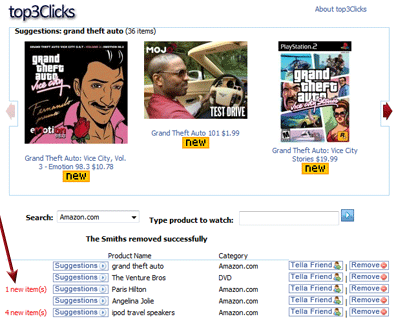
1. We added a 'New Items' column to the item list - As new items become available on Amazon.com, top3Clicks updates your item list with the number of new items that have become available.

Here is a top3Clicks screenshot of what we added:


2. Emails - When we launched, we were sending quite a bit email listings. The email provided all the items on your list that had new items available. When you clicked on the item you were sent back to top3Clicks to look at the items.

We are now delivering one daily email in the morning detailed listing of all new items. If you click on any specific item, will take you right to Amazon.com for more details, etc. about that item.

Here is what the email looks like:


3. Notifications - We started sending 4 or so notifications a day, providing a list of each new item on your list that had something new become available.

We are now delivering one notification to you daily in the afternoon. The notification is a simple reminder that there are new items. When you click on this notification you will be sent to the top3Clicks app in Facebook where you will be able to see what items are new (number 1 above)you list that have new items.


Thanks again for all the feedback. If you find top3Clicks to be useful, please pass it along to your friends. We love the feedback.

-- the BaconMarathon team

Tuesday, May 13, 2008

When the Bay Area (San Francisco) hits 100 degrees it is time for the BaconMarathon team...

...to announce something really sizzlin...

The BaconMarathon team has been working feverishly on a project called top3Clicks.

The project consists of marrying the social network and notfication power of Facebook with the ecommerce power of Amazon.com.


top3Clicks is 'Social Commerce'.

To get started...

1. You will need to have a Facebook account. Go to:
http://www.facebook.com/ and create an account. You may be the last one of your friends to not have one!

2. Once you have an account, simply go to
http://apps.facebook.com/topthreeclicks, you will be taken to the top3Clicks Add Application screen.

3. When top3Clicks is added as an application, interests listed in your Facebook profile are placed in a top3Clicks item list. Item suggestions (from Amazon.com) will appear based on these interests. You can easily add and remove items, as well as notify friends about items.


4. If there is a item that your are interested in purchasing, simply click on the item and you will be taken to Amazon.com to complete the order.

So give it whirl...! Tell us what you think, we love the feedback.

-- BaconMarathon team